Notepad - simple notes
- 4.5
- Rating
- 10.00M
- Installs
- Free
- Price
 Analysis by App-foxy
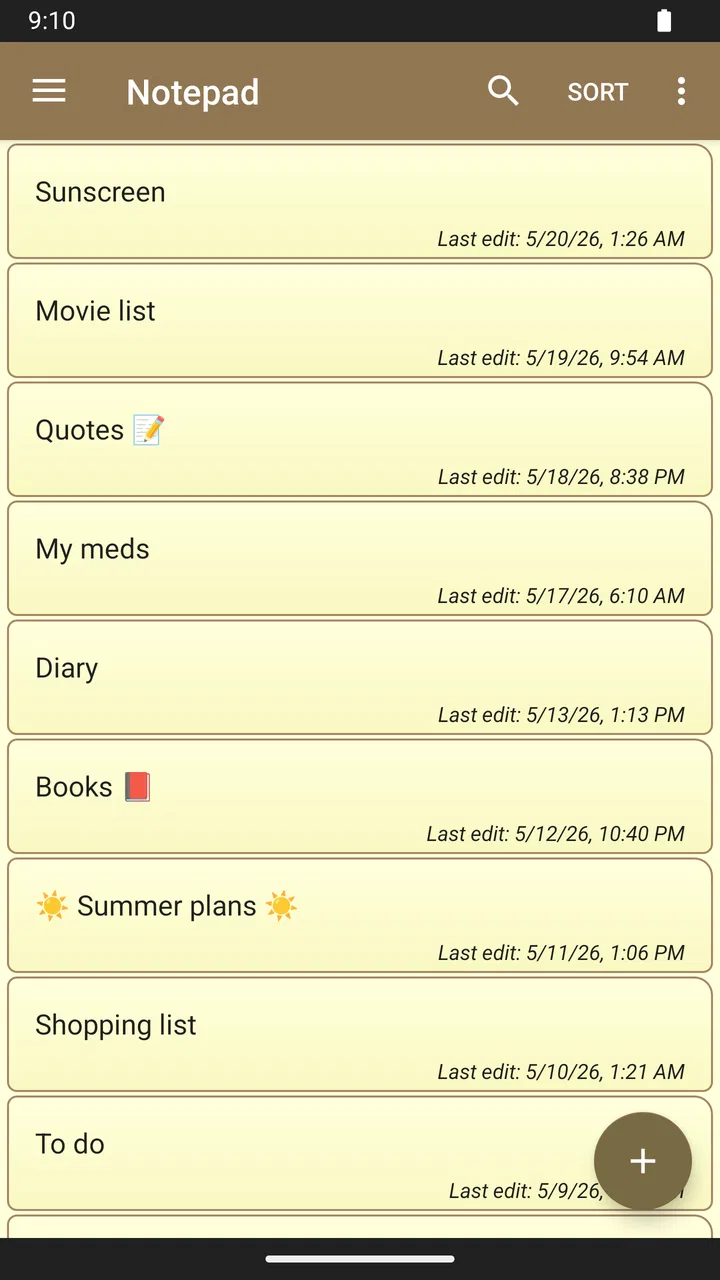
I like productivity apps that stay out of the way, and Notepad - simple notes takes that idea seriously. It is a small writing tool for Android rather than an all-purpose organizer, so the experience feels closer to opening a blank sheet of paper than setting up a complicated workspace. I used it with short reminders, longer drafts, shopping notes, and temporary text, and its main appeal became clear quickly: it gives me somewhere to write without asking me to manage a system first.
That simplicity is also the key to deciding whether it belongs on your phone. If you want a lightweight place for plain text, this app is easy to understand and comfortable for everyday use. If you expect calendars, task assignments, rich formatting, shared documents, or a deep filing system, you will probably find it too narrow. My review focuses on that trade-off, especially how its modest design affects speed, heavier note-taking, reliability, and use on older Android devices.
A plain writing space that opens quickly
Notepad - simple notes is a free productivity app from atomczak. It is suitable for Everyone, runs on Android 6.0 or later, and was released on February 23, 2017. Those details matter because this is not a demanding modern workspace built around large media files or elaborate collaboration tools. Its purpose is much more direct: create and read text notes with as little friction as possible.
You May Also Like

 Blood Strike: 2.5 Anniversary
Blood Strike’s Loadouts Turn Every Drop Into a Tactical Gamble
A close look at Blood Strike’s custom loadouts: how fast access to signature weapons reshapes its battle royale rhythm, rewards preparation, and narrows the gap between fights.

 Pandora - Music & Podcasts
Pandora’s Music Is Easy to Start, but Harder to Recover
Pandora’s strength is its low-effort path from a seed to a station. Its weak spot is how much confidence it asks you to place in connection, setup, and quiet recovery.

 8 Ball Pool
 Is Built on Rivalries, Rematches, and Routine
A close look at the rivalries, rematches, shared routines, and unanswered safety questions that turn a quick pool match into a persistent mobile community.

 Samsung Music
’s Quiet Strength Is Playing What You Already Own
Its reach comes less from spectacle than from dependable access to a personal library. That simplicity is both the app’s strongest retention engine and its ceiling.

 AccuWeather: Weather Radar
AccuWeather Review: A Quick, Clear Forecast for Everyday Decisions
For everyday plans, the best forecast is the one you can understand quickly. AccuWeather makes rain timing, radar, and local conditions easy to act on, with a few trade-offs.

 Hill Climb Racing
Why Hill Climb Racing Still Turns Crashes Into One More Run
A tiny car, a bumpy hill and one more upgrade: Hill Climb Racing keeps resurfacing because its simple chaos makes every near-miss feel personal.
More From Our News Desk



In my experience, the strongest part of a simple notepad is the short path between an idea and a saved piece of writing. I do not want to choose a template when I am standing in a shop, remember a phone number, or suddenly think of a sentence for an article. A basic note is often more useful than a feature-rich dashboard in those moments. The app’s restrained approach suits that kind of quick capture.
The interface also makes sense for people who do not enjoy learning new productivity systems. There is no need to understand tags, projects, boards, or complicated workflows before writing. That makes it approachable for a first-time note-taking app user, a family member who wants a digital memo pad, or anyone moving away from scraps of paper without wanting to become dependent on a large service.
The practical advantage is reduced decision-making: when the task is only to write a piece of text and find it again, fewer controls can be a genuine productivity feature. I found that especially useful for temporary notes that are important for a few hours but do not deserve a place in a larger planning system.
What the app feels like during quick everyday use
A realistic example is preparing for a busy morning. I might create a note with a few errands, add an address, paste a confirmation code, and keep a short reminder for later. A dedicated task manager could organize those items more carefully, but it would also introduce more structure than this situation needs. A plain note lets me keep the information together and edit it as plans change.
The same approach works for a rough draft. I can write an idea while travelling, keep a list of questions before a meeting, or store a paragraph that I want to revise on a larger screen later. The app is not trying to replace a full writing suite; it is useful because it handles the first, informal stage of writing without making that stage feel official.
There is a subtle trade-off here. A simple note is flexible because I decide how to arrange the text, but that flexibility can become untidy when a single note grows for weeks. I recommend treating it as a scratchpad or a collection of focused notes rather than forcing one file to become a complete personal knowledge base. Splitting “ideas,” “shopping,” and “work reminders” into separate notes keeps the experience much easier to manage.
Speed expectations and the cost of keeping things simple
For ordinary text, I expect this kind of app to feel responsive because it has a much smaller job than a document editor with images, layouts, and collaboration. In my use, the uncluttered design supports quick opening, quick typing, and quick edits. I never felt that I was waiting for a productivity suite to prepare itself before I could record a thought.
That does not mean every action is automatically better than in a larger app. A simple notepad may save time at the beginning, but finding an old note can require more personal discipline if the collection grows. I have learned to give notes clear, distinctive names instead of relying on vague labels such as “New note” or “Stuff.” That small habit has more effect on long-term speed than adding another feature would.
The app is also a good match for text that should remain text. Short memos, longer passages, copied reference material, and lists can all live comfortably in the same basic format. When I need tables, formatted headings, attachments, or a polished document, I would move the work to a different tool rather than trying to make a notepad behave like one.
How it handles heavier note-taking
Light use is where the design makes the most sense. The more notes I create, the more the limitations of a minimal app become visible—not necessarily as a performance problem, but as an organization problem. A large collection of plain notes can become difficult to scan, especially when several entries cover similar subjects or when temporary reminders are mixed with information I want to keep.
My workaround is to use a consistent naming style and keep each note focused. For example, I would separate a travel checklist from a list of places to visit, even if both belong to the same trip. I also avoid using one note as an endless diary unless I have a clear reason to do so. These habits reduce scrolling and make the app feel more manageable during busy periods.
For longer text, the experience depends on what I am trying to accomplish. Drafting an article section, writing a personal reflection, or collecting research snippets works well when I want a distraction-free surface. Editing a structured document with many sections is less comfortable because a plain notepad does not provide the same visual navigation as a dedicated word processor.
I would also be careful with the idea of using it as the only home for irreplaceable information. A note-taking app can be convenient for quick capture, but important records deserve a deliberate backup or transfer routine. Before changing devices or clearing storage, I would review the notes I care about and make sure they exist somewhere else. That is a sensible precaution for any small, local-style writing tool, not a reason to dismiss this one.
Reliability, recovery, and sensible habits
Reliability in a notepad is less about impressive features and more about confidence while typing. I want the app to stay out of the way, preserve my text, and let me return to a note without confusion. The straightforward design helps because there are fewer moving parts to understand. I can keep my attention on the words instead of monitoring a complicated workflow.
Still, I do not treat a basic note as a replacement for a dedicated backup system. When a note contains an address, a draft, or a temporary list, the consequences of losing it may be minor. When it contains years of personal writing or essential reference material, the consequences are different. My advice is to use this app for convenient access and quick writing, while periodically copying valuable content to a more deliberate storage location.
Recovery is also easier when notes are written in a way that remains useful outside the app. I prefer plain, descriptive text over a collection of unexplained fragments. Adding a date or a short context line at the top of a time-sensitive note helps me understand it later, even if I eventually move the text elsewhere. This is one of the less obvious strengths of plain notes: they are easy to reuse because they do not depend on elaborate formatting.
Another useful habit is to clean up temporary notes regularly. I might keep a shopping list for a day, a packing list for a week, and an idea for several months. Reviewing them prevents the note list from becoming a storage drawer full of forgotten scraps. The app does not need to impose a productivity philosophy; I can choose my own, but I need to apply it consistently.
Device constraints and who should use it
Because it supports Android 6.0 and later, Notepad - simple notes can suit people using older phones that are not eligible for many newer apps. That broad compatibility is valuable for a basic writing tool: a spare device, an older family phone, or a budget handset can still have a practical place for reminders and text drafts. I would not expect a plain notepad to demand the same resources as a large office or cloud workspace.
Its small scope also makes it a sensible choice when I want to conserve attention as much as device capacity. There are no project dashboards to maintain and no elaborate setup before writing. That can make it feel calmer than a full productivity platform, particularly on a phone used mainly for calls, messages, navigation, and occasional notes.
However, older-device compatibility does not turn it into a complete replacement for every modern note service. If your workflow depends on synchronized access across several devices, team editing, rich attachments, or advanced search, you should choose an app built around those needs. A plain notepad is best when the value lies in direct text entry, not in a network of connected tools.
The app’s age rating of Everyone also fits its straightforward purpose. I can recommend it to someone who wants a basic digital memo space without presenting it as a specialized tool for school management, business operations, or professional document production. Its simplicity is welcoming, but it also means the user must supply the organizational method.
How it compares with familiar alternatives
Compared with a paper notebook, this app is easier to edit and carry on a phone that is already in my hand. I can correct a sentence without crossing it out, copy text when I need it, and keep a note available while switching between everyday tasks. Paper still has advantages for sketching, visual planning, and people who enjoy writing by hand, so the choice depends on the kind of thinking involved.
Compared with a full note platform, this app feels less demanding but also less capable. A larger service is the better option when I need notebooks within notebooks, multimedia pages, synchronized work, or collaboration. Notepad - simple notes wins when those features would only slow me down. I see it as a focused tool rather than a smaller version of a much bigger product.
Compared with a task manager, it is more forgiving. I can write an unstructured thought, paste a paragraph, or combine several related details without converting everything into tasks and due dates. The downside is that it will not push me toward completion in the way a task system can. For “remember this,” I prefer the notepad; for “do this by Friday,” I usually want a proper task list.
Compared with a word processor, it is better for rough work and worse for presentation. I would start a draft here when I want to capture ideas quickly, then move it to a document editor once I need layout, formal revision, or sharing. That two-step workflow is more efficient than demanding that one app serve every stage of writing.
Popularity, current release, and day-to-day value
The app has reached over ten million installs, with an average rating of 4.5 from around eighty-six thousand ratings and roughly sixteen thousand written reviews. Those figures suggest that the uncomplicated approach has found a broad audience, and they match my impression that this is designed for ordinary, recurring needs rather than a narrow professional niche.
The current version is 1.43.2. I would still judge it by the job it performs rather than by the size of its version number. A notepad does not need constant visual novelty to be useful. What matters to me is whether I can open it, write clearly, return to the right note, and keep important text under control.
It is free, which makes experimentation easy. I can install it as a secondary writing space without committing to a subscription or rebuilding my entire productivity setup. That is particularly useful if I already use another app for serious organization but want a simpler place for fleeting thoughts. The sensible approach is to test it with a real routine—such as daily errands or article ideas—rather than judging it after writing only one note.
My performance verdict
Notepad - simple notes succeeds because it respects the small job it was made to do. I found its restrained format well suited to quick capture, plain-text drafts, reminders, and temporary information. Its likely resource demands are modest in comparison with feature-heavy productivity suites, and its support for Android 6.0 or later makes it a practical candidate for older devices as well as newer ones.
The important limitation is not that it tries and fails to be a full office platform; it is that it deliberately is not one. Organization becomes my responsibility as the note collection grows, and valuable content should be copied or preserved thoughtfully. People who need synchronization, collaboration, rich media, or task automation should look elsewhere or use this only as a companion.
I recommend it when your priority is dependable simplicity rather than a complete productivity ecosystem. For a quick shopping list, a private draft, a meeting reminder, or a place to collect thoughts before sorting them later, it is refreshingly direct. I would skip it as my main tool for complex projects, but for everyday plain-text notes, Notepad - simple notes earns its place by making the basic action—writing something down—feel uncomplicated.
FAQs for Notepad - simple notes
01What features does Notepad - simple notes offer?
Notepad - simple notes provides a straightforward interface for creating and organizing notes. Key features include text formatting options, color-coded organization, and the ability to create checklists. Users can also sync notes across devices and share notes via email or social media, making it versatile for both personal and professional use.
02Is Notepad - simple notes available offline?
Yes, Notepad - simple notes functions offline, allowing users to create and edit notes without an internet connection. Once reconnected, notes automatically sync across all devices. This feature is especially useful for users who need to access or write notes on the go, without relying on Wi-Fi or data.
03How secure is my data in Notepad - simple notes?
Notepad - simple notes prioritizes user data security by offering password protection for individual notes. Additionally, cloud sync options are encrypted, ensuring that your information remains private. Users are encouraged to enable these security features for added peace of mind regarding sensitive or personal data.
04Can I customize the appearance of my notes?
Yes, Notepad - simple notes allows customization of note appearance. Users can change background colors, choose from different font styles, and organize notes with tags and folders. This level of customization helps users personalize their experience and improve their workflow by visually distinguishing different types of notes.
05Does Notepad - simple notes support collaboration?
While Notepad - simple notes is primarily a personal tool, it does support basic collaboration features. Users can share notes directly via email or social media, allowing others to view or edit them. However, it does not offer real-time collaborative editing, so it's best suited for sharing information rather than simultaneous collaboration.
Pros
- Intuitive user interface for easy navigation.
- Quick note creation with minimal steps.
- Lightweight app with low storage usage.
- Syncs across devices for easy access.
- Customizable themes to suit user preferences.
Cons
- Lacks advanced formatting options.
- No voice-to-text functionality available.
- Limited integration with other apps.
- No password protection for notes.
- Ads can be distracting for some users.

Notepad - simple notes
Gallery